

Design leaders building AI agents into their product design for the first time approach with anticipation of a design problem. What is the right interface? How do we show progress? When do we use a chat metaphor versus something more structured? These are the right questions, but too often, they’re being asked too late, and in the wrong order.
Most product teams have shipped at least one AI feature to date. Fewer have designed an end-to-end agentic workflow that their users genuinely trust, adopt, and see consistent value from. That's the harder problem. The teams building agent-powered products well understand something others learn the hard way: the UX patterns cannot be designed in isolation from how agents and LLMs actually work. Designers still create the experience, but the strongest patterns are shaped by the constraints of the system itself.
Execution time, context size, non-determinism, tool selection, and discoverability of agent capabilities - these are not implementation details to hand off to engineering. They are design constraints. If you do not understand them early, you build experiences that feel broken, cost more than they should, and erode user trust at exactly the moment the product needs to build it.
Teams looking to put these principles into practice can explore our AI Innovation Hub, where we break down how agent mechanics translate into real product decisions.
This article covers what design, experience, and product leaders need to understand to get this right - a practical framework for making the product decisions that matter (without the technical primer). We’ll cover:
- What AI agents are and how they differ from standard LLM calls
- What product leaders need to know about AI agents - the mechanical realities that directly constrain design choices
- The product decisions most teams get wrong - and how to approach them well
- How to start, validate, and safely roll out agentic features
What LLM mechanics mean for your product
AI agents are built on large language models (LLMs). You do not need to understand every technical detail, but two specific behaviors shape product and UX decisions in ways you cannot ignore.
Non-determinism: why the same prompt gives different results
LLMs predict the next word or symbol based on context. Given the phrase “London is the capital of…”, the model predicts “England” because it has encountered this sequence extensively in training. But not all outputs are so predictable. LLMs can select responses in ways that vary between runs. Simply, the same prompt can produce different results. This is not a bug. It is a fundamental property of how these models operate, and it has direct implications for how you design, test, and evaluate your product.
Time to first token and LLM response latency: a design constraint
Before an LLM produces any output, it must process all of the input - converting it into numerical vectors, loading them into memory, and beginning prediction. That processing time is called time to first token. A short question to Claude might produce a response in one second. Give it hundreds of Jira tickets to classify and the delay grows significantly.
Product leaders must consider this as a design requirement. Every agentic workflow has a time to first token profile, and that profile determines what the user sees, how long they wait, and whether they trust the system enough to stay. Understanding how time to first token affects product design is what separates teams that design around agent mechanics from those that discover the problem after launch.
Model size is the biggest driver. Larger, more capable models take longer to respond because more parameters must be processed. Smaller models respond faster but may produce lower-quality outputs. This trade-off - between intelligence and latency - is one of the most consequential decisions in designing an agentic product. Yes, it belongs in the engineering discussion, but it also belongs in the product design conversation.
It also helps to separate two ideas that are often bundled together: time-to-first-token and response latency. Time to first token is the delay before the user sees the first sign of output. Response latency is the total time it takes for the system to complete the task. In a simple LLM call, those may feel almost the same. In an agentic workflow, they separate quickly: the agent may start responding, then call tools, validate results, revise its answer, and continue working across several steps. That is why streaming matters.
For a deeper look at how latency, orchestration, and system constraints impact real-world deployments, read our article on agentic AI in architecture.
Streaming: a constraint that becomes a design asset
LLMs generate tokens sequentially. Each token depends on the one before it, so the model cannot produce the full response instantly. Rather than making users wait for a complete response, developers stream tokens as they are generated - which is why text appears gradually in ChatGPT, Claude and similar products.
Streaming is a technical limitation that product teams have turned into a UX advantage. It gives users a sense of progress and makes the experience feel responsive rather than frozen. For agentic products, this pattern becomes even more important as workflows grow longer and more complex.
What is an AI agent, and how does it differ from an LLM call?
Many people initially think of an AI agent as a more powerful version of a chatbot. In practice, the distinction is structural, and it matters for how you design the product around it.
A standard LLM call produces a single response to a single input. An AI agent is a sequence of LLM-driven completions and actions. Agents connect to external tools - APIs, databases, internal services, command-line utilities, third-party platforms - and may take multiple turns before completing a task. Each turn involves the LLM selecting a tool, the tool being called, the result being returned to the model, and the model deciding what to do next.
What is a tool in an AI agent context?
Tools are how agents interact with the world beyond the LLM itself. A tool can:
- Retrieve data - for example, fetching a weather forecast or pulling a list of Jira tickets
- Perform actions - for example, creating a calendar event or updating a database record
- Ask the user for confirmation or clarification on a risky or ambiguous step
Importantly, tools do not run on the LLM provider’s infrastructure. They run in the deployment environment of your product. The LLM decides which tool to call and how to call it. The tool itself is a function or API that your team creates and deploys.
How an agent works in practice
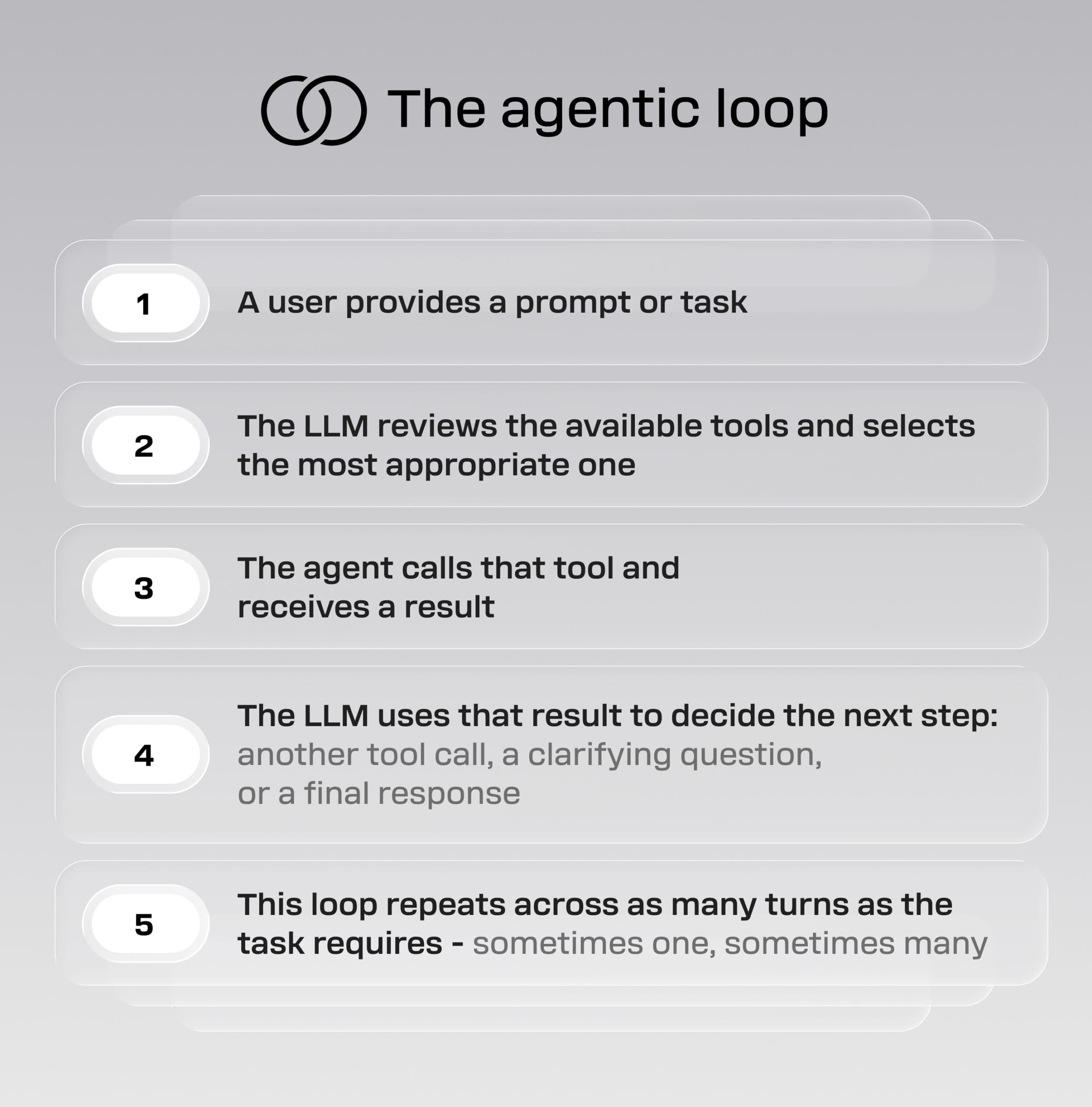
The shift from a single LLM response to a multi-step agentic loop creates a fundamentally different set of design challenges. How do you represent progress when the system is working across multiple turns? How do you keep users oriented when the agent might change course mid-task? How do you build trust when the system can be technically successful but still produce the wrong outcome?
These are not edge cases. They are the central design problems of agentic products.
If you want to understand what happens technically between a successful demo and a production-ready agentic system, explore our breakdown of agentic AI architecture in production.
Five UX patterns that emerge from agent mechanics
The following patterns are not arbitrary design choices. Each one exists because of a specific behavior in how agents operate. Understanding the mechanic behind each pattern is what allows you to apply it well - and to invent new ones appropriate to your product.
1. Dynamic, just-in-time interfaces
Agents are not limited to text outputs. They can output structured data that your UI renders dynamically - image carousels, charts, maps, web forms, or any other component type. This is possible because the same tool-calling mechanism that lets an agent create a Jira ticket can also be used to decide how to present information to the user.
This is a meaningful expansion of what product output can look like. Rather than designing a fixed response format, you design a range of possible output types and let the agent select the most appropriate one based on the task. A request for a cake recipe might return a formatted card with images. A data question might return a chart. A structured comparison might return a table.
The design implication is that you are no longer designing a single response template. You are designing a system of output possibilities and the rules that govern when each one is appropriate.
2. Dynamic onboarding and multi-step workflows
Traditional onboarding relies on predefined wizards with fixed steps. Agentic experiences can replace or augment these with adaptive flows that respond to what the user actually tells the system.
Rather than step one, step two, step three - identical for every user - an agent can say: “Let me ask you three questions”, then present steps tailored to the answers. This is particularly effective when onboarding depends on user type, maturity level, or environment. Enterprise versus SMB setups, regulated versus non-regulated configurations, experienced versus new users - a single agent can handle all of these without predefined branching logic in the UI.
The design challenge shifts from “how do we map every possible path” to “how do we constrain the agent’s options so that every path it generates is coherent and trustworthy”.
3. Progress states that reduce abandonment
Time to first token and LLM response latency is unavoidable. What varies is how you design the experience around it. The standard “Thinking…” message is a minimal solution. More effective approaches communicate the type of work being done, not just the fact that work is happening.
Specific, task-relevant language reduces anxiety and increases perceived control. “Reviewing your request…”, “Checking existing tickets…”, “Validating formatting…” all tell the user something meaningful. Claude Code takes this further by using varied verbs - “nesting”, “frosting” - that change with each interaction, making the experience feel distinctive rather than mechanical.
The principle: users need both reassurance and orientation. Communicating the type of work being done, rather than the mere fact of it, keeps users engaged through delays that are technically unavoidable.
4. Notifications for long-running tasks
Some agentic tasks take seconds. Others - particularly in development workflows - take minutes or longer. A chat-style interface where the user is expected to wait is insufficient for these cases.
Notifications become a core UX pattern when task duration extends beyond a few seconds. Push notifications, email, or integration with platforms like Slack and Teams allow the user to leave and return. This is not just a convenience feature - it is a recognition that agentic systems are increasingly running as background processes, not just synchronous interactions. Not every agent is a chatbot. Some are background tasks that process, analyze, and report without any real-time user interaction at all.
5. Transparent change visualization
When an agent modifies text, configuration, or code, a simple “Done” message is usually insufficient. Users need to see what changed in order to review it, trust it, and act on it.
Diff-style visualizations - showing which lines were added, removed, or modified, with context around each change - make agentic outputs reviewable. Before-and-after sliders work for visual content. Structured change summaries work for configuration or data changes. These patterns do more than look good: they make agentic workflows governable, especially in enterprise environments where the consequences of errors multiply.
If you’re exploring how these patterns translate into real-world product experiences, our AI Innovation Hub includes examples, frameworks, and applied use cases across industries.
The agentic product design decisions most teams get wrong
More context is not a reliable strategy
When an agent begins producing unreliable results, the instinctive response is to add more context - more instructions, more examples, more rules. This often makes things worse.
Larger contexts can distract the model during tool selection. The quality and relevance of context matter far more than the quantity. A focused, minimal context often produces better results than an exhaustive one - and does so faster and more cheaply.
This is counterintuitive but well-supported in practice. Stripping a context down to only the instruction, the project-specific information, and the minimum set of tools required for the task often increases output quality significantly - while enabling the use of smaller, faster, and cheaper models for certain steps.
Context pollution is a system design problem
Giving an agent too many tools degrades performance. The model must process all available tool descriptions as part of its context, which increases the chance of the model selecting the wrong tool.
The solution is to treat tool access as a product surface - designed and constrained intentionally. Provide tools dynamically – only the tools necessary for each task. Consider using sub-agents with defined roles, each with access only to the tools relevant to their function, rather than a single agent handling everything with full tool access. Quite helpful when your agent needs to access the Web – a sub-agent with Web access will encapsulate all the inefficiencies related to processing HTML pages and will output only relevant data to the parent agent.
There is a broader pattern here: the most effective agentic products are often the most constrained ones. Limitations are not a weakness to apologize for. They are a design mechanism for producing faster, more accurate, more trustworthy outcomes.
Verification must be built into the workflow, not added at the end
Do not rely on the agent’s own confidence as a signal of correctness. LLMs can produce fluent, well-formatted, plausible-sounding outputs that are wrong. Agent evaluation must be treated as a product discipline, not just an engineering task.
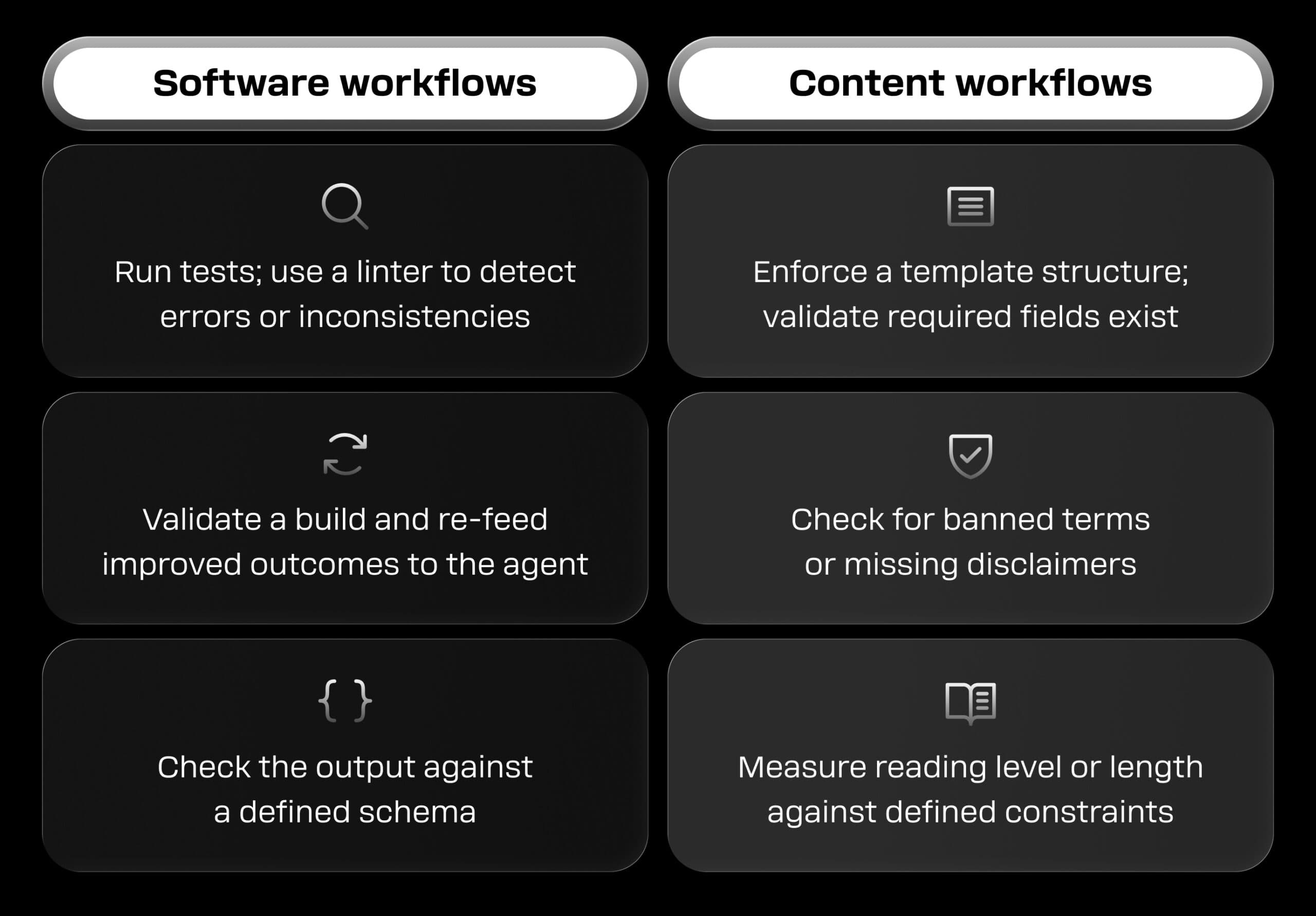
The practical solution is to design closed-loop workflows: the agent produces a result, then uses a tool to validate that result before declaring the task complete. Deterministic checks - running a linter, validating against a schema, checking for required fields, measuring output against defined constraints - are often more reliable than relying on the LLM to self-assess.
Cost and time are product requirements, not engineering metrics
In products without agents, runtime cost is rarely a front-of-mind design concern. With agents, it must be. Multiple LLM calls, tool invocations that retrieve large datasets, and external API calls that vary unpredictably in size all compound quickly. A single agent loop that browses the web, for example, might encounter pages ranging from 1KB to several hundred KB - a thousand-fold difference in context size and a significant difference in cost.
For product design leaders, this means two things. First, cost must be factored into how agentic features are packaged, priced, and scoped. A feature that is cheap in testing can become expensive at scale. Second, time cannot be treated uniformly. Some tasks should feel instantaneous. Others can take longer if the perceived value justifies the wait. Defining acceptable latency thresholds for each agentic flow is a product decision that must be made before, not after, architecture choices are locked in.
This requires alignment between design and engineering leadership. Decisions about progress indicators, step-by-step flows, and validation loops are tightly linked to model selection and system architecture. These conversations need to happen together.
Evaluation is a product quality discipline
Traditional software testing checks deterministic outputs - does clicking this button produce this result? With AI agents, outputs are probabilistic and LLM providers update models continuously. A model update from Anthropic or OpenAI can change your product’s behavior without any action on your part.
The solution is to pin LLM versions, build evaluation into the product lifecycle, and upgrade to a newer version only when evaluations are satisfactory. Run agent workflows against a defined set of prompts and conditions regularly. Compare performance across model versions. Use these runs to detect regressions before they reach users. Evaluation is not a one-time exercise - it is an ongoing product quality practice.
For a closer look at the production issues that emerge over time, see ‘Agentic AI architecture in production: What fails between demo and real-world use’.
Just-in-time programs: when agents need to compute, not predict
One of the clearest illustrations of where LLMs belong in a product workflow, and where they don't, is the problem of computation. LLMs predict tokens. They are not calculators. If you give an agent a spreadsheet with 200 rows and ask it to compute monthly aggregations, the model cannot reliably perform those calculations - because mathematical functions are not something it predicts. It has to be a deterministic computation, not a token prediction.
The solution is just-in-time programs. Anthropic has this feature built in and calls it programmatic tool calling. Rather than feeding the spreadsheet as text into the model, you provide the agent with tools to read from the spreadsheet, and let the model generate a short program - perhaps ten lines of Python - that performs the required calculation. That program then runs deterministically, using the tools to retrieve the data, and returns an accurate result.
The LLM handles orchestration and interpretation. Deterministic computation handles the mathematics. The user asks their question in natural language and receives an accurate, trustworthy answer.
This pattern matters for product leaders because it defines where LLMs belong in a product workflow and where they do not. Use them for reasoning, language, and decision-making. Use deterministic functions for anything where accuracy is non-negotiable.
How to approach designing an agentic product
The following principles reflect how the teams getting this right tend to operate:
- Define where agents genuinely add value. Multi-step orchestration, tool use, iterative refinement, and adaptive workflows are good candidates. Single-step questions with bounded context usually are not. Agents add cost, latency, and more failure modes than a standard LLM call - they should be reserved for workflows that genuinely require them. Knowing when to use an AI agent versus a single LLM call is one of the most consequential early decisions in product design, and one of the most commonly skipped.
- Design the workflow, not only the response. Think about progress states, handoffs between steps, verification loops, and notifications. The experience is not a single output - it is a sequence of moments.
- Constrain tools intentionally. Provide only the tools necessary for each task. Resist the instinct to give the agent access to everything. Constraint improves reliability, reduces cost, and makes the system easier to govern.
- Build verification into the design. Every agentic workflow should have a closed-loop validation step. The user experience should make it clear when the system is generating versus checking its own work.
- Build evaluation into the product lifecycle. Test prompts regularly across model versions. Treat regressions as a product quality issue, not just a technical one.
- Use dark launching to reduce rollout risk. Keep the user interface unchanged while a new agent version runs in the background, logging results. This allows you to validate performance using real user prompts and real context before committing to a full rollout. It is especially useful in high-trust contexts - compliance, finance, enterprise operations - where the cost of a bad experience is high.
For teams moving from concept to implementation, our AI Innovation Hub brings together practical guidance, tooling approaches, and case-based insights to accelerate delivery.
Build agentic products that users trust
The teams that get agentic product design right are not the ones with the most sophisticated models. They are the ones who understand that the mechanics of how agents work should directly shape the experience built around them.
That means treating LLM and AI agent architecture as a design constraint, not a backend detail. It means building verification into workflows rather than relying on model confidence. It means constraining context and tools intentionally - because focused agents outperform bloated ones. Build evaluation into the product lifecycle so that model updates do not silently degrade the experience your users depend on.
How to build user trust in AI agent workflows is ultimately the central challenge of agentic product design. The question in production is never “can the agent do it?”, it is “will users trust it, adopt it, and see consistent value from it over time?”
At Star, we connect business strategy with technology execution to build agentic products that answer that question well. We design agent workflows that are scoped correctly, validated with context, and built to stay reliable as models evolve.
FAQs
An LLM call typically produces a single response to a single input. An AI agent is a multi-step workflow: it uses an LLM to decide what to do next, calls tools, interprets the results, and may take multiple turns before completing the task. The shift from a response to a workflow is what creates the new UX and product design challenges.